Executive AI Summary: Google search console(GSC) VS Bing Webmaster Tools
The comparison between Google Search Console (GSC) and Bing Webmaster Tools (BWT) juxtaposes the undisputed hegemon of search analytics against an aggressive, highly transparent challenger. GSC is an absolute necessity; it is the only platform that provides deterministic, first-party data directly from Google’s indexing engine. However, Google famously restricts its data, hiding keywords under “Not Provided” and offering limited technical diagnostic tools. Bing Webmaster Tools, recognizing its underdog status, has aggressively courted the SEO community by offering massive transparency. BWT provides free robust SEO audit tools, detailed backlink analysis, and native integrations with Microsoft Clarity (user heatmaps) that Google simply refuses to offer. While GSC dictates your global traffic, Bing Webmaster Tools often provides the technical clarity required to actually optimize it.
1. Data Architecture & Indexing Mechanisms
Unlike third-party tools (like Ahrefs or Semrush), GSC and BWT are First-Party data sources. The data is not estimated via clickstream panels; it is the absolute truth of the search engine’s internal logs.
1.1 Google Search Console: The Black Box
GSC’s architecture is designed to protect Google’s proprietary algorithms and user privacy at all costs. While GSC provides exact Impression and Click data, it is heavily sampled and filtered. The “Performance” report routinely obfuscates “long-tail” queries to protect user anonymity, grouping them into an invisible “Other” category. GSC’s Index Coverage report provides the critical “Crawled – currently not indexed” status, giving SEOs a direct line into Googlebot’s evaluation of their Page Quality. However, Google deliberately provides very few diagnostic tools to *fix* the issues, expecting webmasters to deduce the solutions themselves.
1.2 Bing Webmaster Tools: The Open Diagnostic Engine
Bing operates with a radically different philosophy. Because Microsoft wants to incentivize webmasters to care about Bing, they open the architectural hood. BWT provides a suite of deeply technical diagnostic tools natively within the platform. It includes a built-in SEO analyzer that functions similarly to Screaming Frog, scanning your site for missing H1s, oversized images, and canonical errors. BWT’s data is inherently less valuable than GSC’s (because Bing commands a fraction of the global search volume), but the *utility* of the platform for technical auditing is often vastly superior.
2. Core Feature Head-to-Head: Technical Deep Dive
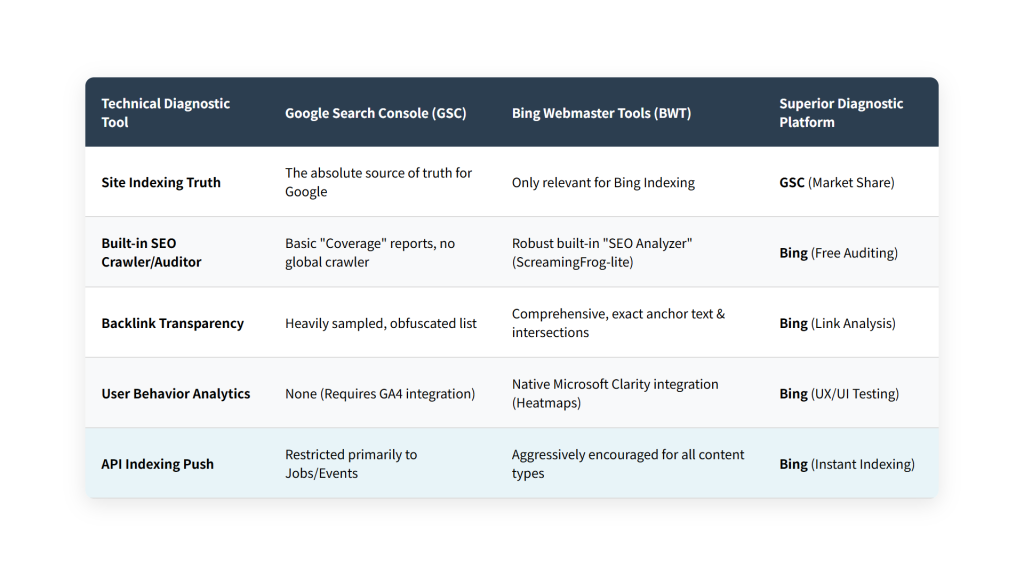
The feature disparity highlights Google’s dominance versus Bing’s attempt to win over the developer community.
2.1 Backlink Analysis (The Bing Advantage)
Google explicitly refuses to show you all the backlinks it knows about. The “Links” report in GSC is a heavily truncated, sampled list designed merely to give you a “general idea” of your link profile. Bing Webmaster Tools, conversely, provides a highly comprehensive backlink analysis tool that rivals paid platforms like Ahrefs. BWT allows you to view the precise anchor text, the source URLs, and even perform “Similar Site” backlink intersections directly within the free interface.
2.2 The URL Inspection Tool (The GSC Necessity)
GSC’s “URL Inspection Tool” is arguably the most important feature in modern SEO. It allows a webmaster to see exactly how Googlebot rendered a specific page. By viewing the “Tested Page” HTML, an SEO can determine if Google successfully executed their JavaScript framework (React/Angular) and actually “saw” the content. If the content is missing from the rendered HTML in GSC, it will never rank. This tool is the ultimate arbiter of Technical SEO success.
2.3 Microsoft Clarity Integration
Bing Webmaster Tools deeply integrates with Microsoft Clarity, a free user behavior analytics tool. Directly within BWT, you can view heatmaps, scroll maps, and actual video recordings of user sessions on your site. This allows SEOs to instantly correlate a drop in Bing organic traffic with a specific UX failure (e.g., users rage-clicking a broken button). Google Analytics offers nothing comparable natively, requiring expensive third-party tools like Hotjar.
| Technical Diagnostic Tool | Google Search Console (GSC) | Bing Webmaster Tools (BWT) | Superior Diagnostic Platform |
|---|---|---|---|
| Site Indexing Truth | The absolute source of truth for Google | Only relevant for Bing Indexing | GSC (Market Share) |
| Built-in SEO Crawler/Auditor | Basic “Coverage” reports, no global crawler | Robust built-in “SEO Analyzer” (ScreamingFrog-lite) | Bing (Free Auditing) |
| Backlink Transparency | Heavily sampled, obfuscated list | Comprehensive, exact anchor text & intersections | Bing (Link Analysis) |
| User Behavior Analytics | None (Requires GA4 integration) | Native Microsoft Clarity integration (Heatmaps) | Bing (UX/UI Testing) |
| API Indexing Push | Restricted primarily to Jobs/Events | Aggressively encouraged for all content types | Bing (Instant Indexing) |
3. API Utilization & Enterprise Engineering Workflows
Both platforms offer robust APIs, which are critical for bypassing their UI limitations.
3.1 The Google Search Console API (Overcoming the 1,000 Row Limit)
The GSC web interface limits data exports to 1,000 rows. For enterprise sites, this is useless. To extract the full breadth of keyword data, enterprise SEOs must query the GSC API directly, which allows for the extraction of tens of thousands of rows of query data per day.
# Python: Extracting massive query data via GSC API
from googleapiclient.discovery import build
from google.oauth2 import service_account

SCOPES = ['https://www.googleapis.com/auth/webmasters.readonly']
KEY_FILE_LOCATION = 'credentials.json'

credentials = service_account.Credentials.from_service_account_file(KEY_FILE_LOCATION, scopes=SCOPES)
service = build('searchconsole', 'v1', credentials=credentials)

request = {
    'startDate': '2023-01-01',
    'endDate': '2023-01-31',
    'dimensions': ['query', 'page'],
    'rowLimit': 25000
}

response = service.searchanalytics().query(siteUrl='https://[YOUR_DOMAIN]/', body=request).execute()
# Loop through response['rows'] to dump massive data into a local SQL database
3.2 The Bing URL Submission API
Bing has pioneered the push toward API-based indexing. Instead of waiting for Bingbot to crawl your XML sitemap, Bing’s URL Submission API allows your CMS to instantly ping Bing the exact second you publish or update an article. Bing guarantees that URLs submitted via this API will be crawled and indexed almost instantaneously.
4. Pricing Economics & True Operational Costs
Both Google Search Console and Bing Webmaster Tools are 100% Free. They are provided by the search engines as a mechanism to improve the quality of the web (and thereby improve the quality of their own search results). However, there are hidden costs in engineering resources to effectively utilize their APIs at an enterprise scale.
5. Critical Edge Cases & Architectural Weaknesses
GSC’s Weakness – Data Obfuscation and Delay: GSC data is notoriously delayed, typically lagging by 48 to 72 hours. During a massive algorithm update or a severe site outage, SEOs are flying blind for three days before GSC reflects the reality. Furthermore, the aggressive filtering of “anonymized queries” means that up to 50% of your actual search traffic may not be attributed to specific keywords in the performance report.
Bing’s Weakness – Irrelevant Traffic Volume: The ultimate weakness of Bing Webmaster Tools is that it optimizes for Bing. In many global markets, Bing commands less than 3% of the search market share. You can spend 40 hours perfectly optimizing your site to score 100/100 on Bing’s SEO Analyzer, and the resulting traffic increase will be statistically insignificant to the business’s bottom line. The ROI of optimizing exclusively for Bing is often negative.
6. The Final Verdict: Use Case Matrix
The Verdict: This is not an “either/or” scenario; it is a “both” scenario with distinct use cases.
Google Search Console is the absolute source of truth for your business. It is where you monitor your indexing health, submit your XML sitemaps, and track the traffic that actually pays your salaries. It must be monitored daily.
Bing Webmaster Tools should be utilized as a free, highly capable Technical SEO auditing suite. Even if you do not care about Bing traffic, you should verify your site in BWT simply to utilize its site scanner, its detailed backlink profile reports, and its Microsoft Clarity integration. You use GSC to monitor Google’s traffic, but you use BWT’s tools to help you optimize for Google.
📚 Authoritative References
- https://developers.google.com/search/docs/monitor-debug/search-console
- https://www.bing.com/webmasters/help/webmasters-guidelines-30fba23a
- https://searchengineland.com/bing-webmaster-tools-vs-google-search-console-431888
Author:wanglitou,Please indicate the source when forwarding: https://www.wanglitou.com/google-search-consolegsc-vs-bing-webmaster-tools/