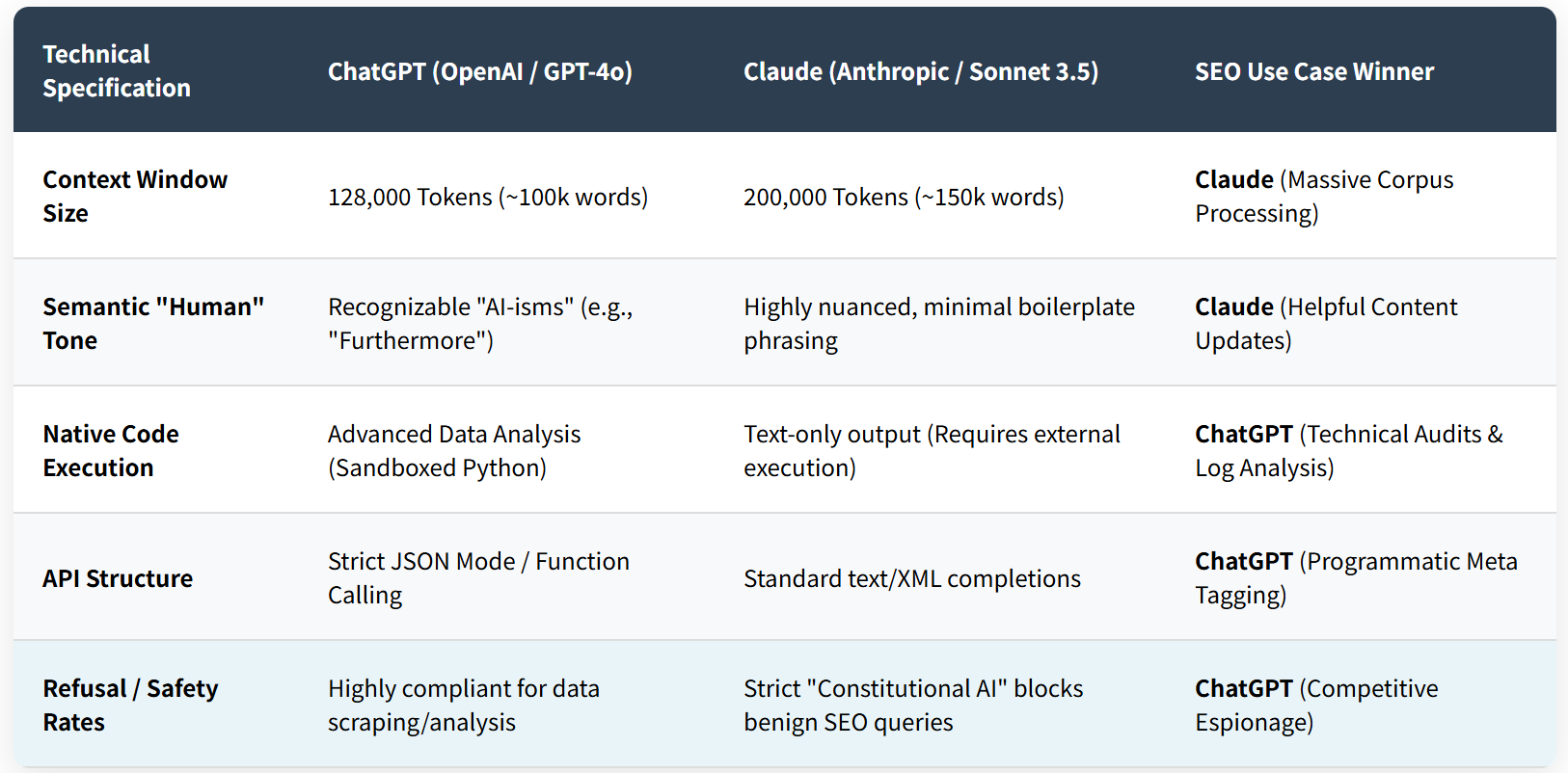
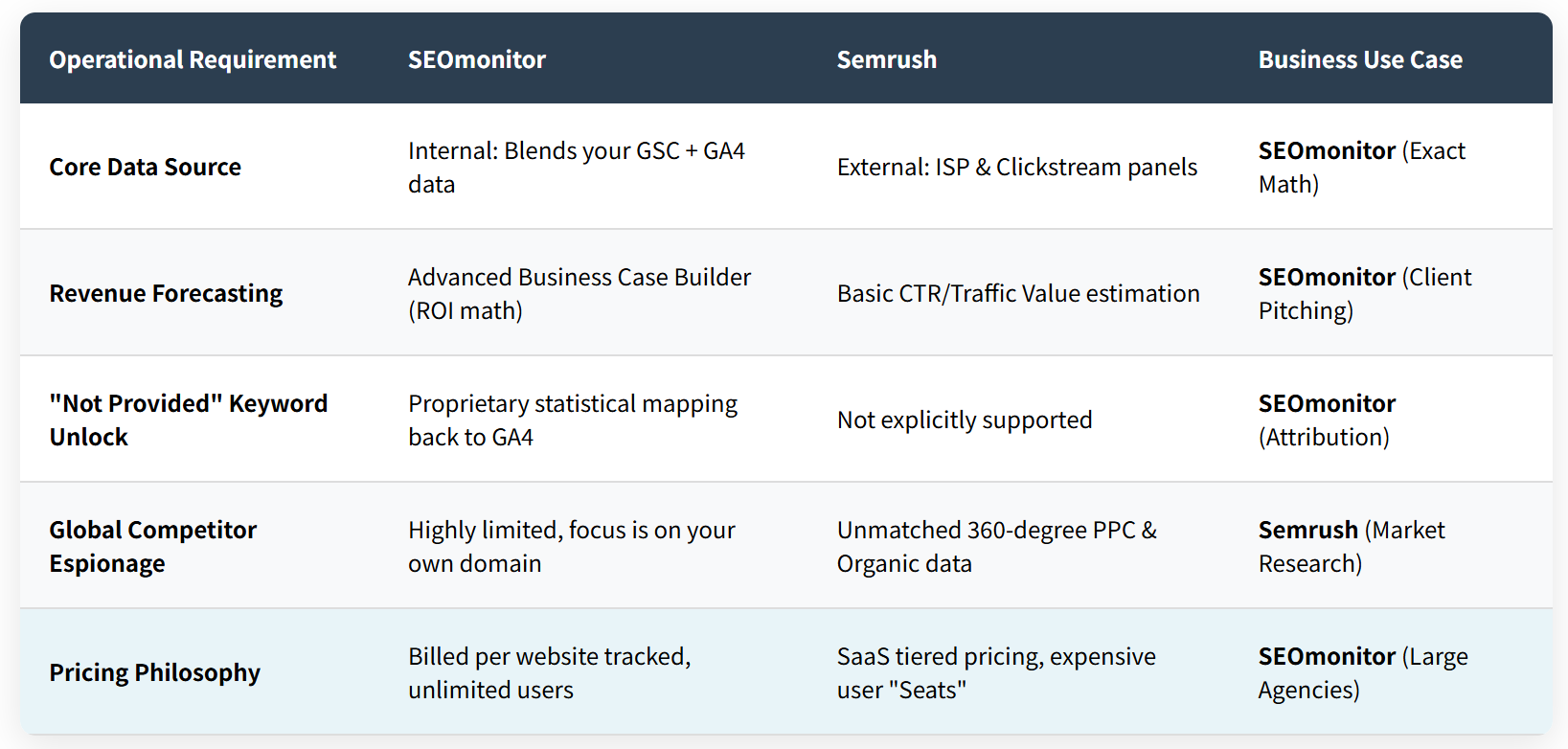
Gemini 的终极武器是与 Google Workspace 的集成. 您可以打开 Google 文档, 类型 “@双子座”, 并指示它: “总结上周我从 John Doe 收到的有关第四季度 SEO 策略的电子邮件, 提取行动项目, 并将它们格式化为本文档中的表格。” 这个层次深, Perplexity 目前无法实现跨应用程序数据检索. Gemini 充当整个企业无所不在的数字助理, 而 Perplexity 则充当高度专业化的研究终端.
2.3 实时网络爬取能力
虽然两者都可以访问互联网, Perplexity 的爬虫针对实时新闻和利基论坛进行了积极优化. Perplexity 经常绕过标准 SEO 拦截器从 Reddit 检索数据, 学术期刊, 和晦涩难懂的子版块, 综合社区共识. 双子座, 在 Google 更严格的公司合规性和索引规则下运营, 可能拒绝解析某些动态内容或总结极具争议性的实时事件,以避免声誉受损.
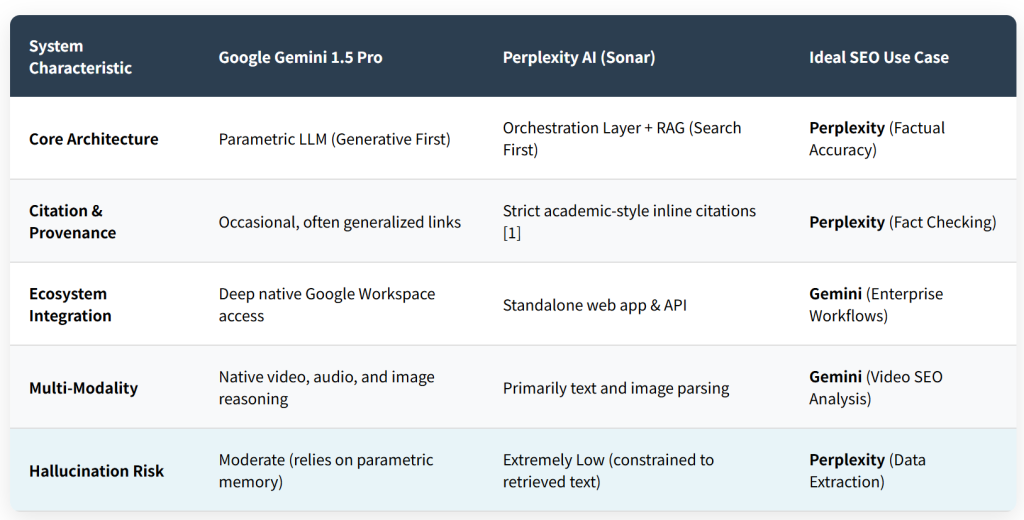
系统特点
谷歌双子座 1.5 专业版
困惑人工智能 (声纳)
理想的 SEO 用例
核心架构
参数法学硕士 (生成第一)
编排层 + 抹布 (首先搜索)
困惑 (事实准确性)
引文 & 出处
偶然, 通常是广义的链接
严格的学术风格内联引用 [1]
困惑 (事实核查)
生态系统整合
深度原生 Google Workspace 访问权限
独立网络应用程序 & 应用程序编程接口
双子座 (企业工作流程)
多模态
原生视频, 声音的, 和图像推理
主要是文本和图像解析
双子座 (视频SEO分析)
幻觉风险
缓和 (依赖于参数存储器)
极低 (仅限于检索到的文本)
困惑 (数据提取)
3. API利用 & 企业工程工作流程
将这些引擎集成到企业软件中需要不同的 API 策略.
3.1 双子座API (谷歌人工智能工作室)
Gemini API 非常强大, 特别适用于多模式应用. 您可以传递原始视频文件 (最多 1 长达一小时) 通过 API 并请求特定视觉事件的高度详细的 JSON 时间戳细分.
# Python: Utilizing Gemini API for Multi-Modal Analysis
import google.generativeai as genai
import os

genai.configure(api_key=os.environ["GEMINI_API_KEY"])
model = genai.GenerativeModel('gemini-1.5-pro')

# Assuming a video file has been uploaded to the File API
video_file = genai.get_file(name="files/sample-video-id")

prompt = "Analyze this competitor's promotional video. Extract the core value propositions they mention and output them as a JSON list of strings."

response = model.generate_content([video_file, prompt])
print(response.text)
3.2 困惑API (声纳模型)
困惑提供了它的 “声纳” 通过 API 的模型, 针对基于搜索的文本生成进行了大量优化. 这对于构建需要保证事实准确性和源 URL 的自动化研究代理的 SEO 来说是理想的选择.
# Python: Utilizing Perplexity API for Grounded Research
import requests
import json

url = "https://api.perplexity.ai/chat/completions"

payload = {
    "model": "llama-3-sonar-large-32k-online", # Grounded model
    "messages": [
        {"role": "system", "content": "You are a technical SEO researcher."},
        {"role": "user", "content": "What are the latest known Google algorithm updates from the past 30 days? Cite your sources."}
    ],
    "return_citations": True
}
headers = {
    "Authorization": "Bearer YOUR_PERPLEXITY_API_KEY",
    "Content-Type": "application/json"
}

response = requests.request("POST", url, headers=headers, json=payload)
data = response.json()
print("Answer:", data['choices'][0]['message']['content'])
print("Citations:", data.get('citations', []))